Chapter 18. Real world tools
When developing real-world software, Rustaceans typically rely on many fantastic external crates, despite the robust built-ins the language has to offer.
One of the most important aspects of writing programs in Rust is their performance, which we typically measure with benchmarking. Fortunately, Rust has a fairly ubiquitous benchmarking tool. Let's dive in.

Say, do you think they call it a nail gun because it shoots nails? - Al Borland (Home Improvement)
Benchmarking
The Rust's ecosystem's tool for benchmarking is called Criterion.rs, a benchmarking system ported from Haskell.
Let's fire up a small test case and discover a few things we can do with it.
What we're going to benchmark
In solving something recently I had to break down an integer into its digits. Of course we can always use the base and divide, however, when writing this, I longed for something more idiomatic to the language.
You know, something functional with iterators and all that - because that's how we Rustaceans rock! That said, I was also curious as to the overhead that this introduced, versus the arithmetic solution.
Breaking down digits
-
The arithmetic solution:
pub fn get_digits_arithmetic(mut n: u32) -> Vec<u32> { let mut digits = Vec::new(); while n > 0 { digits.push(n % 10); n /= 10; } digits.reverse(); digits } -
The idiomatic version:
pub fn get_digits_idiomatic(mut n: u32) -> Vec<u32> {
    std::iter::from_fn(|| {
        if n > 0 {
            let digit = n % 10;
            n /= 10;
            Some(digit)
        } else {
            None
        }
    })
    .collect::<Vec<_>>()
    .into_iter()
    .rev()
    .collect()
}
Now we should test these and make sure they work before moving on.
Super simple unit tests
We'll do this right in our lib.rs file.
#[cfg(test)]
mod tests {
    use super::*;

    #[test]
    fn get_digits_arithmetic_works() {
        let result = get_digits_arithmetic(20);
        assert_eq!(result, vec![2, 0]);
    }

    #[test]
    fn get_digits_idiomatic_works() {
        let result = get_digits_idiomatic(20);
        assert_eq!(result, vec![2, 0]);
    }
}
💥 cargo test passes like a charm.
Using criterion
To use criterion.rs we need to add a benches directory and a benchmark.rs file inside of it, plus a [[bench]] directive in our Cargo.toml.
Once we've got these we can rock cargo bench and get some stats on our functions above.
benchmark.rs
So assuming the functions above are public, we can use the following to do statistical runtime comparison of the two functions.
use criterion::{black_box, criterion_group, criterion_main, Criterion};
use criterion_benchmarks::{get_digits_arithmetic, get_digits_idiomatic};

fn benchmark_digits(c: &mut Criterion) {
    let test_number = 123456789;

    // Benchmark the arithmetic implementation
    c.bench_function("get_digits_arithmetic", |b| {
        b.iter(|| get_digits_arithmetic(black_box(test_number)))
    });

    // Benchmark the idiomatic implementation
    c.bench_function("get_digits_idiomatic", |b| {
        b.iter(|| get_digits_idiomatic(black_box(test_number)))
    });
}

criterion_group!(benches, benchmark_digits);

criterion_main!(benches);
Here I've named my crate criterion_benchmarks - use whatever you rocked when running cargo new --lib prior.
Update Cargo.toml
Now add the [[bench]] setup we need:
[[bench]]
name = "benchmark"
harness = false
And the library itself under dev-dependencies:
[dev-dependencies]
criterion = { version = "0.4", features = ["html_reports"] }
We'll use the HTML report feature soon!
Benchmark your heart out
Now we can run our benchmarks with cargo bench. You should get something that looks like the below:
➜  criterion_benchmarks git:(main) ✗ cargo bench
   Compiling criterion_benchmarks v0.1.0 (/Users/thinkjrs/repos/learning-rust/criterion_benchmarks)
    Finished `bench` profile [optimized] target(s) in 1.13s
     Running unittests src/lib.rs (target/release/deps/criterion_benchmarks-7495786da99396e2)

running 2 tests
test tests::get_digits_arithmetic_works ... ignored
test tests::get_digits_idiomatic_works ... ignored

test result: ok. 0 passed; 0 failed; 2 ignored; 0 measured; 0 filtered out; finished in 0.00s

     Running benches/benchmark.rs (target/release/deps/benchmark-3d6e7777710a0ab1)
Benchmarking get_digits_arithmetic: Collecting 100 samples in estimated 5.0006 s (39M i
get_digits_arithmetic   time:   [122.35 ns 125.08 ns 128.04 ns]
                        change: [+8.2527% +12.946% +17.712%] (p = 0.00 < 0.05)
                        Performance has regressed.
Found 3 outliers among 100 measurements (3.00%)
  1 (1.00%) high mild
  2 (2.00%) high severe

Benchmarking get_digits_idiomatic: Collecting 100 samples in estimated 5.0004 s (32M it
get_digits_idiomatic    time:   [150.57 ns 155.18 ns 160.08 ns]
                        change: [+1.1505% +6.5465% +12.033%] (p = 0.01 < 0.05)
                        Performance has regressed.
Found 2 outliers among 100 measurements (2.00%)
  2 (2.00%) high mild
Sweet, eh?
Visualizations and tracking
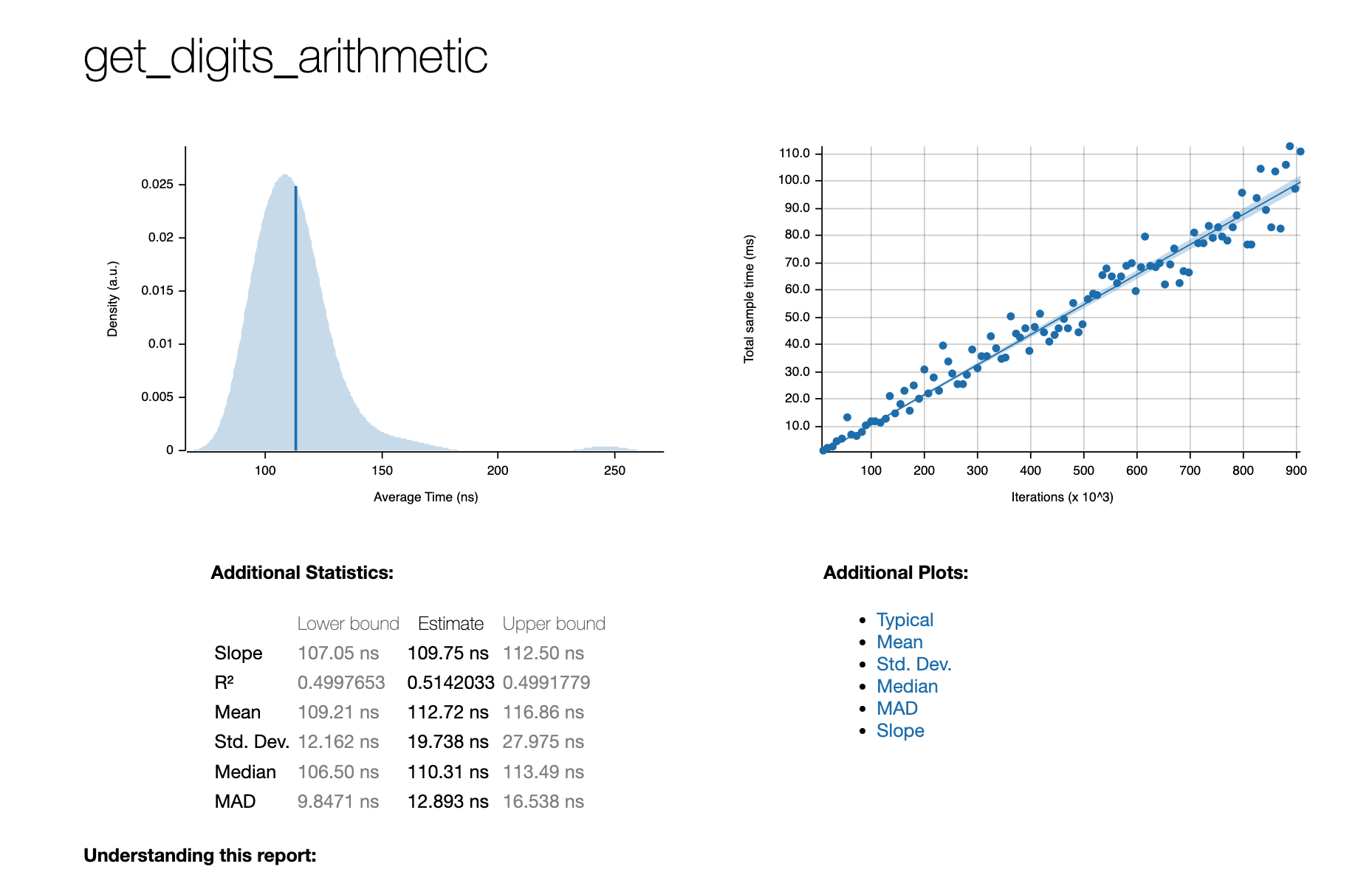
One of the awesome features of criterion.rs is that the benchmarks are tracked and you can visualize them. I believe they call this "batteries included!"
The killer feature here is that these are already done for you. On most systems, simply run the following to open your browser with the report:
open target/criterion/report/index.html
Baselines for tracking
Another amazing feature is the ability to set a baseline against which to measure. Very practically, let's set a baseline to main so that we can measure our features against that baseline. Sounds reasonable, no?
git checkout main
cargo bench -- --save-baseline main
git checkout feature/amazing-new-optimization
cargo bench -- --save-baseline feature/amazing-new-optimization
Then run your benches as normal. And compare them with:
cargo bench -- --load-baseline new --baseline main
Now anytime you make changes there's a built-in means of seeing how those impact the performance of the application. Sick, no?
Summing it all up
Benchmarking in Rust is incredibly easy with criterion.rs.
- Easy Setup: A quick addition to your Cargo.toml and benches directory gets you started.
- Detailed Analysis: Criterion provides time measurements, performance regression checks, and outlier detection.
- Visualizations: Automatically generated HTML reports let you track and compare benchmarks in a user-friendly format.
- Baselines: Save and compare results across branches or optimizations, enabling informed decisions about performance improvements.
With Rust's external tooling, benchmarking helps us gain insight into our code. Now you can ninja-tune your Rust code and feel like a real pro. LFG! 🚀